Unblock Websites Using Proxy: A Simple Guide
Have you ever tried to access a website only to be greeted with a "blocked" message? You've come to the correct place if you're searching for a straightforward solution.
It can be frustrating when you're unable to access the sites you need, whether due to geographical limitations, your job, or your education. The good news is that there are simple solutions for this problem, which many individuals deal with regularly.
You may be back online in a few clicks if you have the proper equipment. Using a proxy server is one of the most effective ways to get around restrictions and browse the internet without any constraints.
What Is a Proxy?
A proxy is a server that serves as an intermediary between your device and the internet. Instead of establishing a direct connection to the website, the proxy routes your request to it and transmits it on your behalf. This suggests that you're browsing from the proxy's area rather than your own.
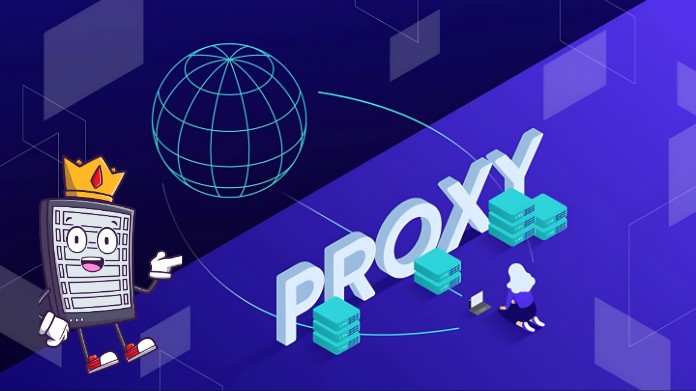
A proxy helps you bypass limitations, conceal your actual IP address, and provides a certain level of anonymity. It is a simple yet effective program that lets you access blocked websites without the requirement to install large applications.
Online proxies are widely utilized, as many of them may be used without any setup right from your web browser. Popular tools like Doge Unblocker enable users to access prohibited content with just a few clicks.
However, utilizing a free or paid proxy service might have varying implications on performance and safety.
How Proxies Help Unblock Websites?
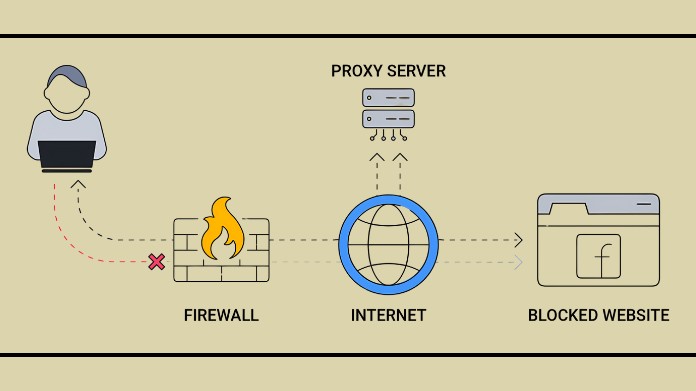
1. Bypass Restrictions: By using a different server, proxies make it appear as though you are browsing from a different location. This allowed you to go on websites that would otherwise be blocked on your network by deceiving firewalls or filters into believing that the request was coming from an unrestricted source.
2. Hide Your Real IP: When you employ a proxy, the web pages you visit will display the proxy's IP address instead of your own. You can bypass restrictions and enhance your privacy by hiding your identity online.
3. Faster Loading (Sometimes): On specific proxy servers, cached versions of websites are stored. To speed up page loading and transfer less data, the proxy might deliver the saved copy if you visit the same websites often.
4. Lightweight Solution: Many proxies can be used immediately through a browser, unlike VPNs that require installation and setup. They are, therefore, a quick and easy choice for individuals who only wish to unblock websites without requiring complex setups.
Popular Types of Proxies
- Web Proxies: Easy-to-use websites that enable you to enter the restricted site's URL and access it via your browser. They require no setup and offer quick access.
- Public/Free Proxies: Free online access, but often slower and less secure. They are not ideal for sensitive jobs, but they can be beneficial for light browsing.
- Paid/Private Proxies: With quicker speeds, better privacy, & continuous access, they are more reliable and safe because they aren't overloaded with people.
How to Use a Proxy to Unblock Websites?
- Find a Reliable Proxy Service: Look for a reliable proxy provider or web proxy. Paid alternatives are superior for speed and security, while free options are suitable for basic browsing.
- Open the Proxy Website or Tool: You don't need to install anything because most web proxies operate directly within your browser. Go to the proxy's website.
- Enter the Blocked Website URL: Enter the website address you want to access into the proxy page's search or URL bar.
- Start Browsing: The proxy retrieves the website for you and displays it in your browser after you press enter. You can browse pages as usual from this point on.
Things to Keep in Mind
- Speed Issues: Because many users share the same server, free proxies may cause browsing to lag.
- Security Risks: Avoid entering sensitive information (like passwords or banking details) when using free proxies.
- Not Foolproof: Some advanced firewalls and networks can still detect and block proxy traffic.
- Limited Features: Unlike VPNs, proxies typically don't encrypt your data, meaning they only provide access, not complete protection.
- Unstable Connections: Free proxies may stop working suddenly, requiring you to switch to another service or provider.
Final Thoughts
One of the simplest ways to unblock websites, particularly for fast and informal browsing, is to use a proxy. They are simple to use, frequently don't require any setup, and are accessible straight from a web browser.
However, proxies might not always be the ideal option for sensitive operations because they can be slow or less secure.
A proxy is helpful if your primary objective is to get around constraints. However, considering options like VPNs might be a better choice for greater privacy and reliable performance.
About the Author:
Hey, I'm Brook Sandford, an enthusiastic tech enthusiast and web developer who enjoys experimenting with technologies that make the internet more open and accessible.
Sharing these techniques, in my opinion, can enable others to explore more freely and keep up with easy tech fixes. I prepared this post to provide easy methods for using proxies to unblock websites.
Are there alternative methods you prefer, or have you ever used a proxy? I'd be curious to hear your thoughts.
Ref:
Bjeljac, P. (2013, May 18). Bypassing internet access control with a proxy website. ResearchGate. https://www.researchgate.net/p...